
Importing a bill of materials (BoM) is handy when you have many different configurations and use the Manufacturing module, for example from a CAD-program export. It is not a flat import: a single BoM consists of a header row with several component rows underneath. That makes it a little trickier than importing products or contacts.
Download: Bill of materials import template (XLSX)
Video: Import BoM
Kevin Zaki recorded a clear walkthrough of the whole process.
| Level | Topic | Link |
|---|---|---|
| Expert | Import BoM | YouTube (21:30) |
The import file
Import BoMs from the Manufacturing app, under Products > Bills of Materials. Build the import file with one header row per BoM and a row per component beneath it. The key columns:
| Column | Contents |
|---|---|
| External ID | External ID of the BoM (e.g. bom_001) |
| Product / External ID | External ID of the finished product |
| Product Variant / External ID | External ID of the variant (optional) |
| Quantity | Quantity the BoM yields |
| Unit of Measure | Unit of measure (e.g. Units) |
| BoM Type | For example “Manufacture this product” |
| BoM Line / External ID | External ID per component row |
| BoM Line / Component / External ID | External ID of the component |
| BoM Line / Quantity | Quantity per component |
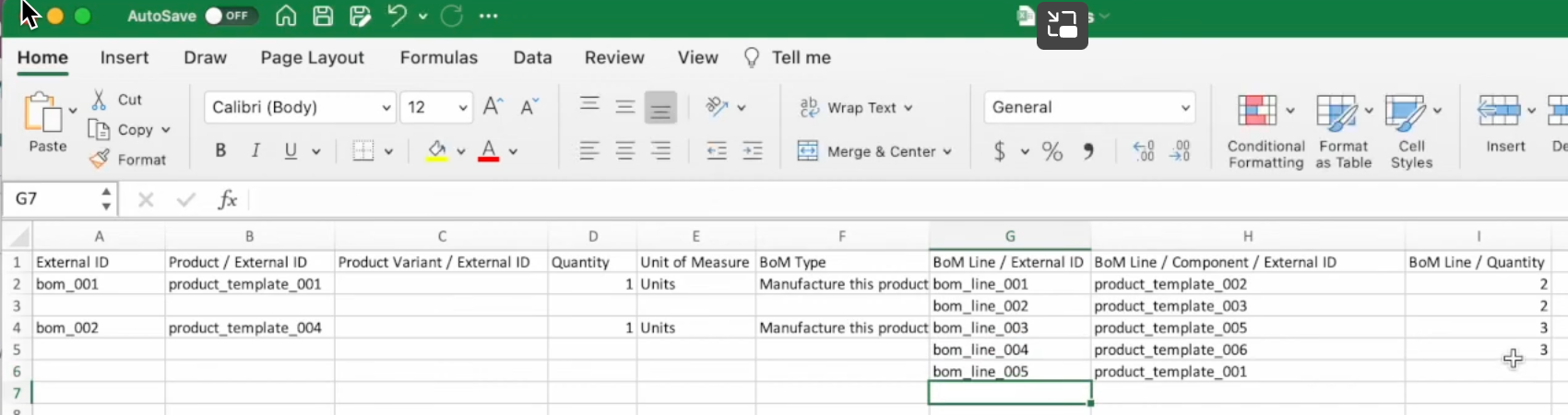
Fill in the header row once; let the matching component rows follow underneath with only the BoM Line columns populated.
Use external IDs
If the products already exist in Odoo, you must use the external IDs of both the products and the components. That way Odoo links each row to the right product instead of creating a new one. The file then looks like this:
Need a hand with your import?
Stuck importing bills of materials? Book an Odoo scan or get in touch - we will take a look with you.