
Below are the steps and points of attention for going live with Odoo Accounting.
Download: Odoo Accounting go-live checklist (PDF)
We usually follow this short checklist:
- Close as many receipts, deliveries and manufacturing orders as possible.
- Import the open customer and supplier items.
- Import stock as an inventory adjustment.
- Import the trial/opening balance (or enter it manually).
- Add and connect your banks. Check that the balance reconciles with the opening balance.
- Import assets via the fixed-asset import model and check that the various accounts reconcile with the opening balance. See the article Import fixed assets into Odoo.
- Enter stock quantities (make sure every product has a cost price) and check that it reconciles with the opening balance.
The video below by Kevin Zaki is a handy guide.
| Level | Topic | Link |
|---|---|---|
| Advanced | Starting balance | YouTube |
Timestamps in the video:
- Preparation up to minute 10
- From 10:00: importing products
- From 11:00: importing general-ledger accounts (adjustments)
- From 17:00: importing stock
- From 18:05: importing sales invoices
- After that: importing purchase invoices
Note: in the example Kevin uses accounts 777777 and 888888 as the suspense account for importing the open items. These are not existing accounts in the standard Odoo chart of accounts. Pick a different P&L account for this.
We prefer to create two temporary balance-sheet accounts that sit close to the receivables and payables accounts. To do so, copy the receivables and payables ledger accounts to, for example: 110001 Receivables opening balance and 130001 Payables opening balance.
Importing sales invoices
The procedure for purchase invoices is almost identical. Prepare the import file as shown in the video.
The standard Dutch chart of accounts in Odoo uses ledger number 110000. From the opening balance, however, we do not want to post here directly. We want to create a credit amount on a balance-sheet account equal to the debit amount you will post for the total of the open sales invoices when posting the opening balance.
To import the open items you use an extra ‘receivables account’ that serves as a temporary suspense account, for example account 110001. The ‘revenue’ is posted here when the invoices are imported. On import you then get the entry:
110000 Receivable
    to 110001 Total outstanding / 'revenue' (do not post VAT)
Your chart of accounts then looks like this:
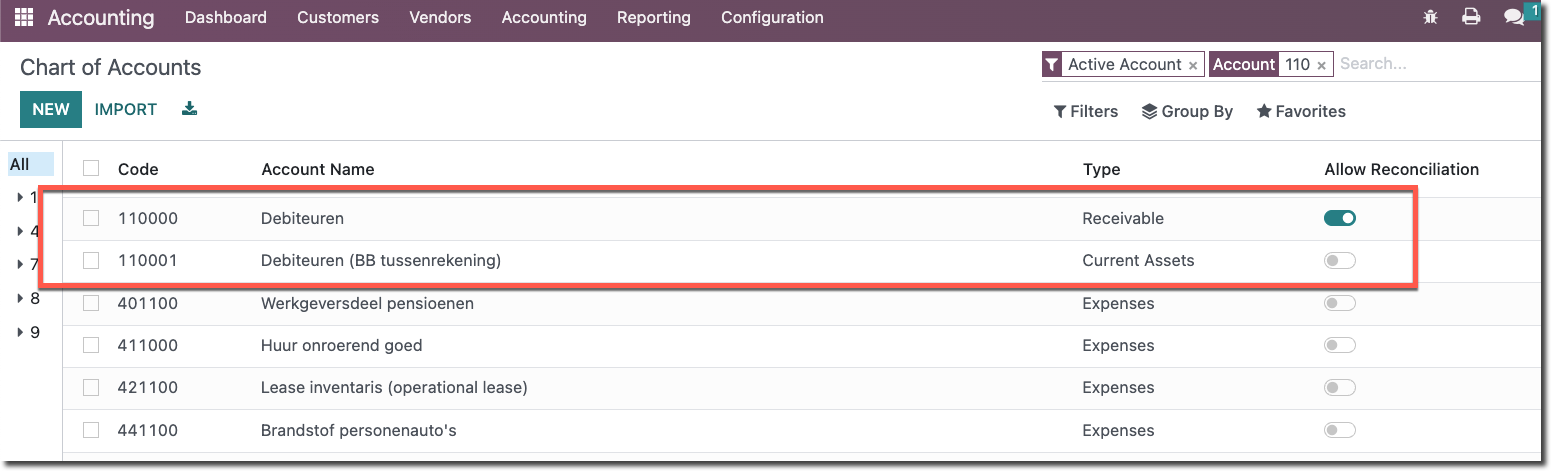
When you enter the opening balance, account 110001 is reversed (debited) again. The open items are now outstanding and can be reconciled against the bank.
The import file in Excel might look like this:
| Number | Partner | Invoice_date | Due Date | Reference | Unit Price | Label | Account |
|---|---|---|---|---|---|---|---|
| INV/2022/00001 | Deco Addict | 2022-12-08 | 2022-01-07 | S00003 | 22137,5 | Opening balance | 110001 |
| INV/2022/00002 | Deco Addict | 2022-12-08 | 2022-01-07 | S00002 | 48012,5 | Opening balance | 110001 |
| INV/2022/00003 | Azure Interior | 2022-12-01 | 2022-01-31 | S00001 | 36512,5 | Opening balance | 110001 |
| INV/2022/00004 | Deco Addict | 2022-11-30 | 2022-12-30 | S00004 | 36512,5 | Opening balance | 110001 |
Note: an important extra column to add is Invoice Lines / Taxes. Leave this column empty. If you do not, VAT is added to the line based on the customer’s fiscal position, which throws off the amount.
Then go to the Customer Invoices journal and start the import there.
Note: if the invoice numbers are not sequential, you will get an error after importing that the invoice numbers are not consecutive. In that case, create a new journal named Customer Invoices (Opening balance) and import the invoices there. Once done, you can archive that journal. For credit notes, add an extra Journal_ID column and enter Customer Invoices (Opening balance) there.
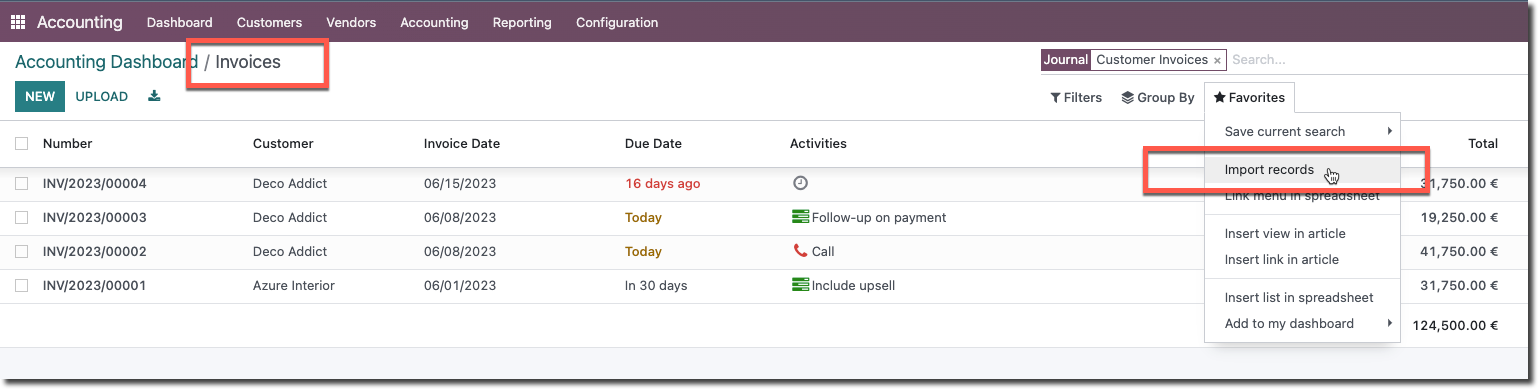
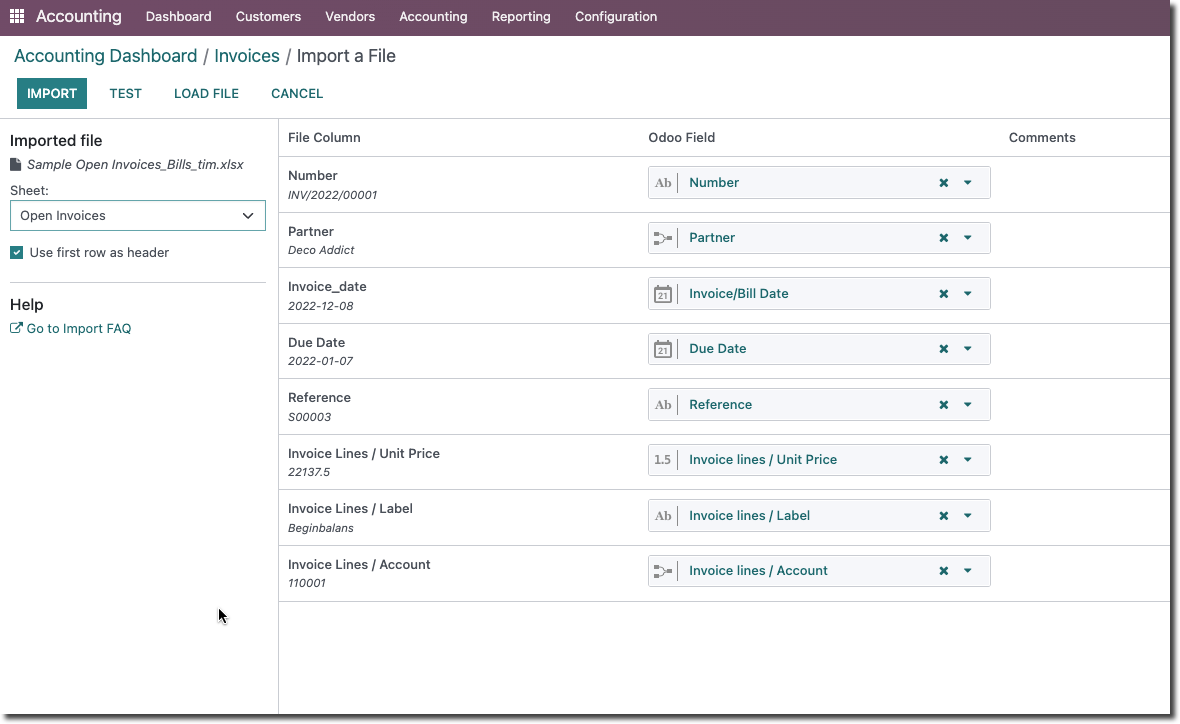
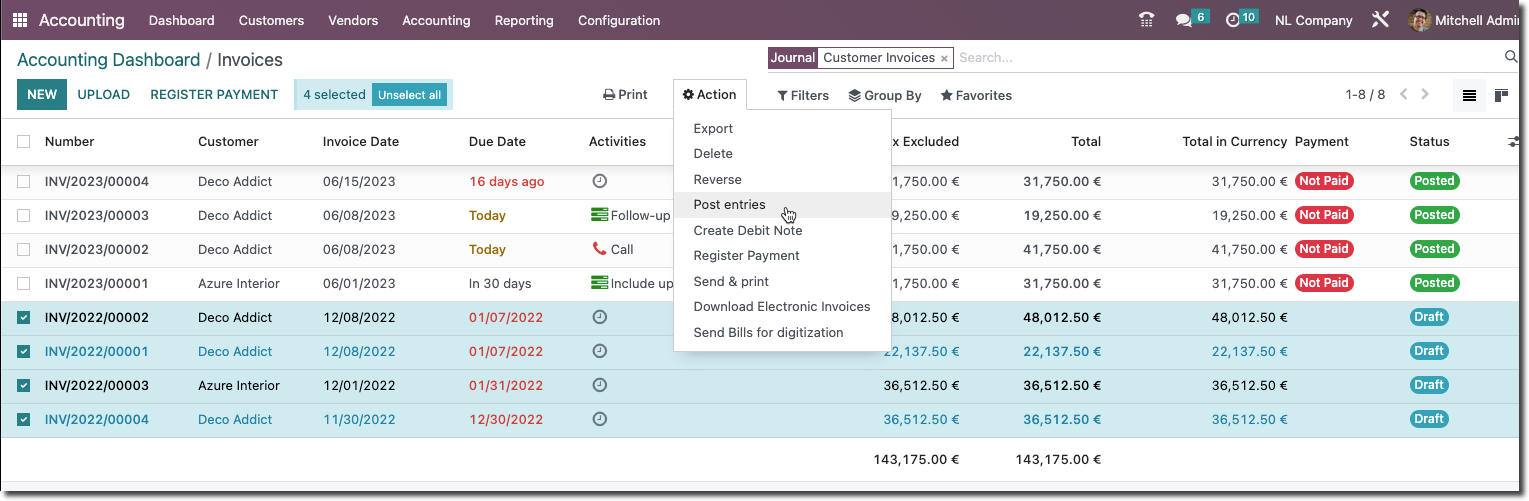
After importing, you still need to post the open items (Post Entries):
If you now open one of the invoices and go to the Journal Items tab, you see the entry created for that item:
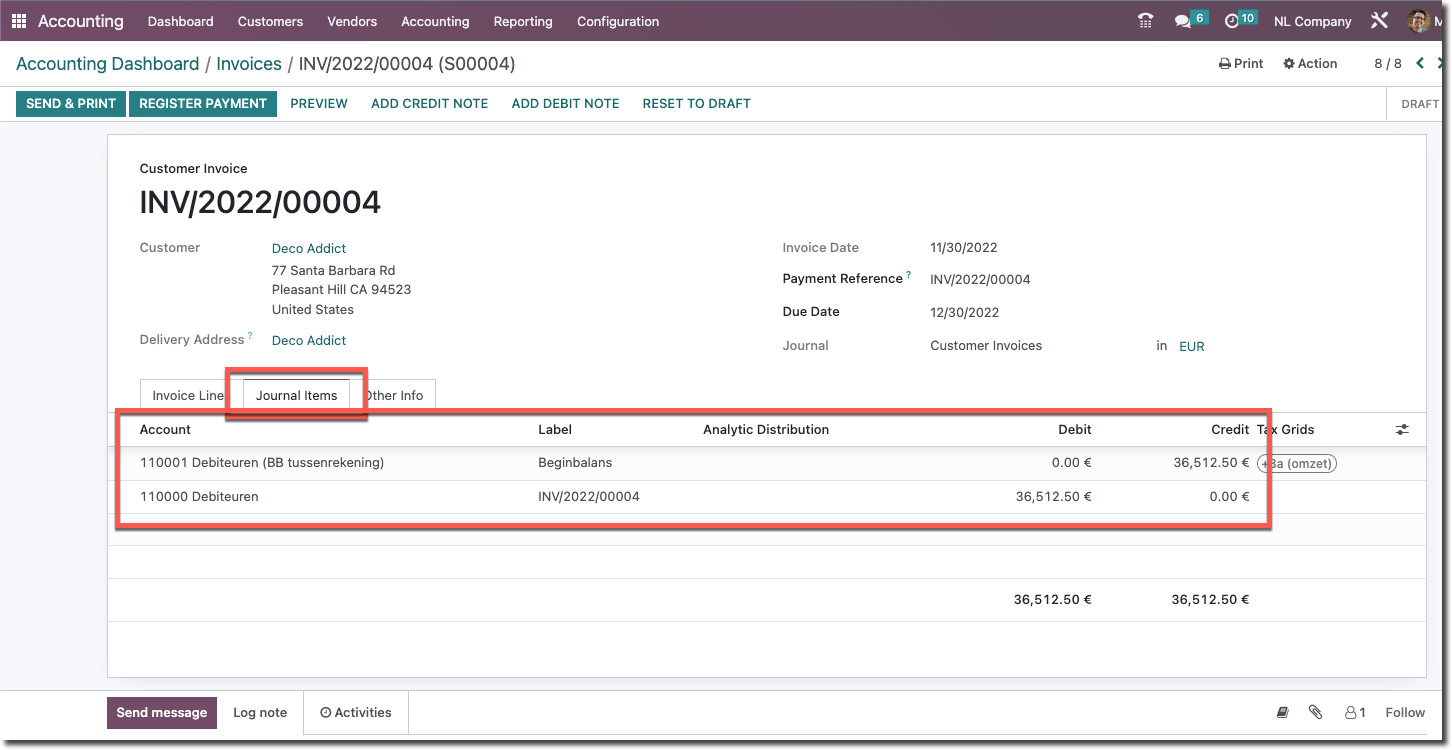
The total of all imported open items is now both debit on account 110000 Receivables on the balance sheet and credit on 110001 Receivables (opening-balance suspense), in our example for an amount of € 143,175.00.
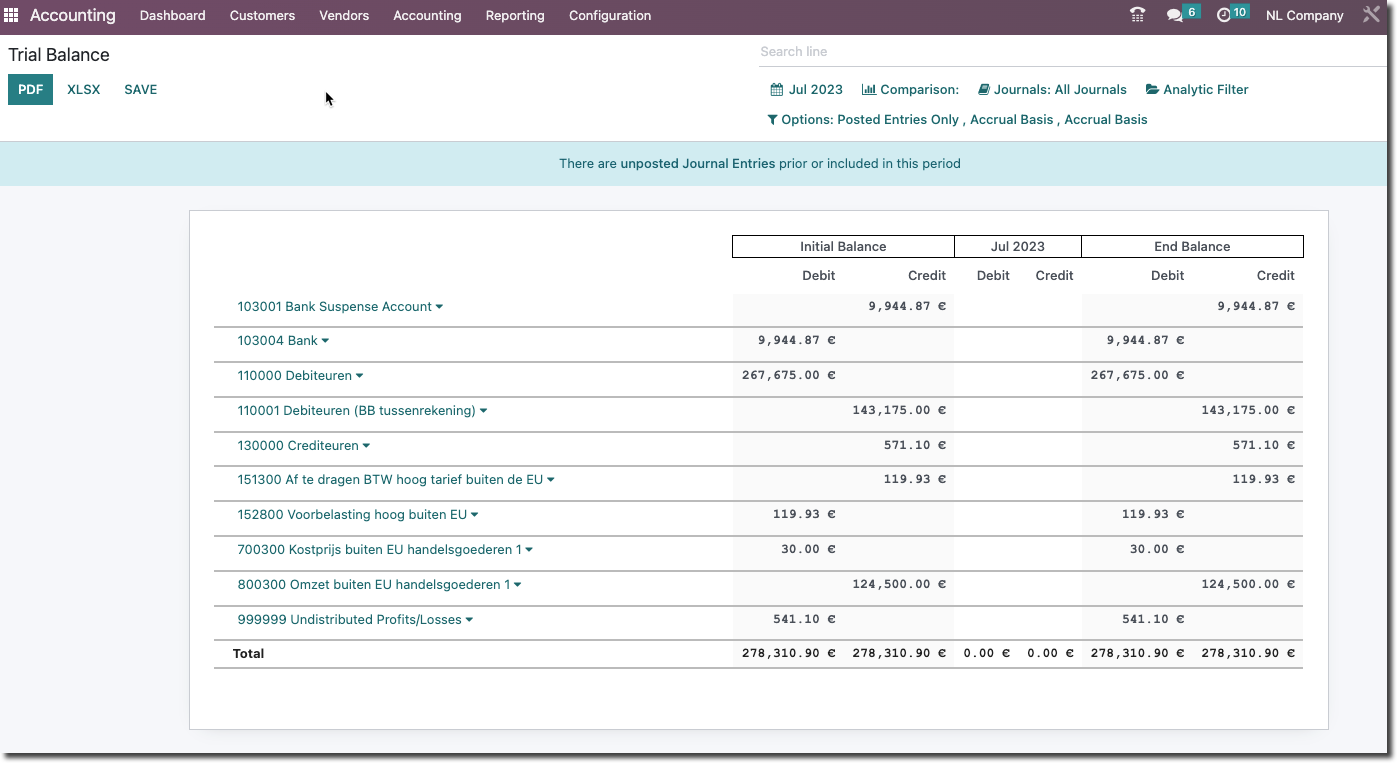
When you post the opening balance, 110001 is reversed again.
Need a hand with your switch?
Stuck on the opening balance or the open-item import? Book an Odoo scan or get in touch - we will take a look with you.