
You are moving to Odoo. That means redesigning your processes, cleaning up your data and agreeing who does what. That exact work is what makes AI useful.
So bring the AI question into the implementation from day one. You go live with an ERP that works and a foundation AI can build on straight away. This article covers why Odoo suits that so well, what it gets you and how we approach it.
What you get
- Less customisation
- Faster integrations with other systems
- No more double data entry
- AI does the hard part, you decide
- More insight without exporting first
- Forecasting, including your cash flow
AI amplifies what is already there
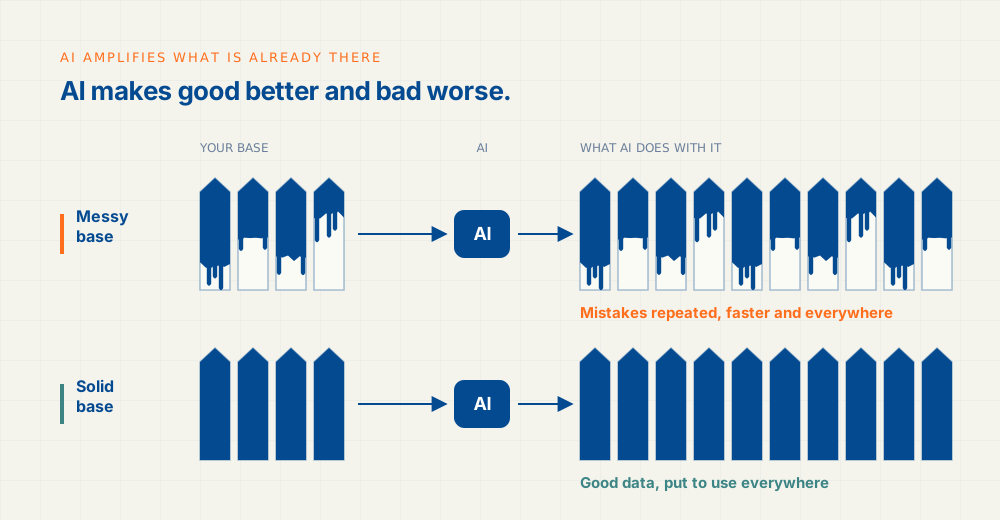
AI learns from what it sees. Customers in your system twice? Stock levels that don’t add up? Everyone posting their own way? AI will repeat those mistakes. Faster, and at scale.
A forecast is only as good as the data under it. A cash flow forecast built on a messy receivables list gives you a nice chart with the wrong answer.
An ERP implementation forces you to clean this up. One customer list. One way of working per process. Clear agreements on who enters what. You are doing that work anyway. Put the AI question next to it and you set things up so AI can pick it up later without rework.
Why Odoo is a strong starting point for AI
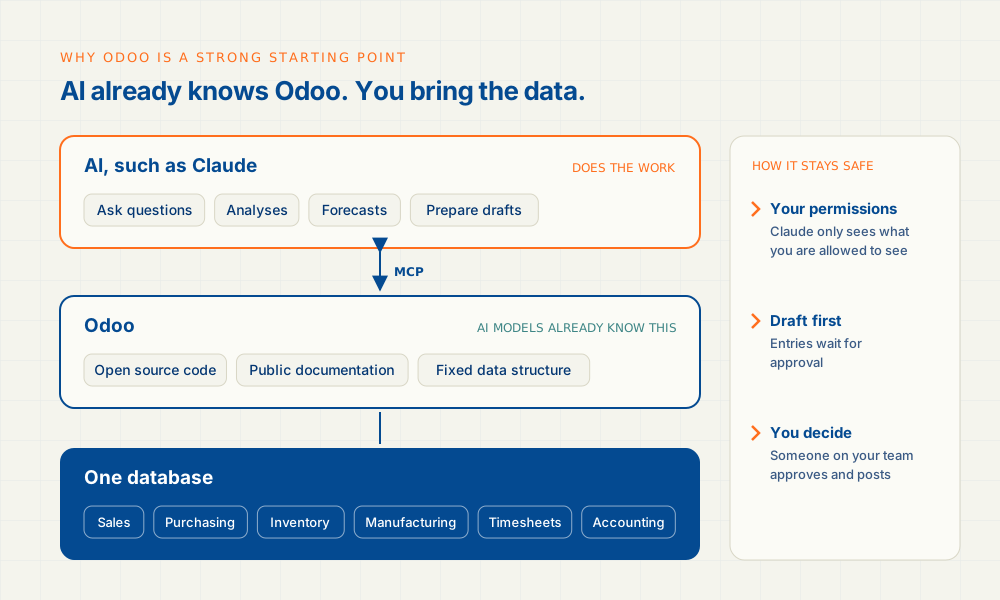
Odoo is largely open source. Its code and documentation are public. That is why the major AI models already know Odoo well. They know how the data fits together, how an order moves through the system and where each field lives. There is little to explain.
Three more things help:
- Everything in one database. Sales, purchasing, inventory, manufacturing, timesheets and accounting sit together. AI sees the whole picture instead of piecing it together from five separate systems.
- An open connection. Through MCP a model such as Claude talks to Odoo directly. It asks questions of your data and prepares work for you.
- Your permissions, your approval. Claude works with the user’s permissions, so it only sees what you are allowed to see. Entries stay drafts until someone on your team approves them.
This is practice. Our project at IDD Parts won this year’s Top Project Award for the best Odoo project in the Netherlands. AI was part of it too.
What it gets you
| What you get | How it works |
|---|---|
| Less customisation | A question that used to become a custom report, you now simply ask your data. You only build what you need every day. |
| Faster integrations | AI knows Odoo and its documentation. A link with a carrier, webshop or supplier is up and running sooner. |
| No double data entry | AI reads delivery notes, order confirmations and invoices and prepares them in Odoo. Nobody retypes anything. |
| AI does the hard part | The digging, the puzzling, the first draft. Your people check and decide. |
| More insight | Analyses, reports and dashboards on live figures, without exporting to Excel first. |
| Forecasting | Demand, stock and cash flow. AI works from the history already in Odoo. |
Four examples you use the very next day
These are applications we make work on your own data after the implementation. Each one comes with a question you can put to Claude as is.
Forecast your cash flow
A weekly forecast from receivables, payables and open orders in Odoo. With scenarios.
Ask Claude: “Build a cash flow forecast for the next eight weeks. What happens if our three largest customers pay two weeks late?”
Prepare journal entries
Claude reads the payroll summary, for example, and prepares the journal entry as a draft. Your team checks and posts it.
Ask Claude: “Read the November payroll summary and prepare the journal entry as a draft.”
Analyse your own data
Margin per customer or product, stock turnover, purchasing trends. Combined with other sources where needed.
Ask Claude: “Which ten products have the lowest margin this year, and how has that changed compared to last year?”
Reports without exporting
A sales forecast or management report on live Odoo figures. No export, no Excel file that is out of date tomorrow.
Ask Claude: “Prepare the October management report: revenue, margin and outstanding items, compared to last year.”
How we approach it
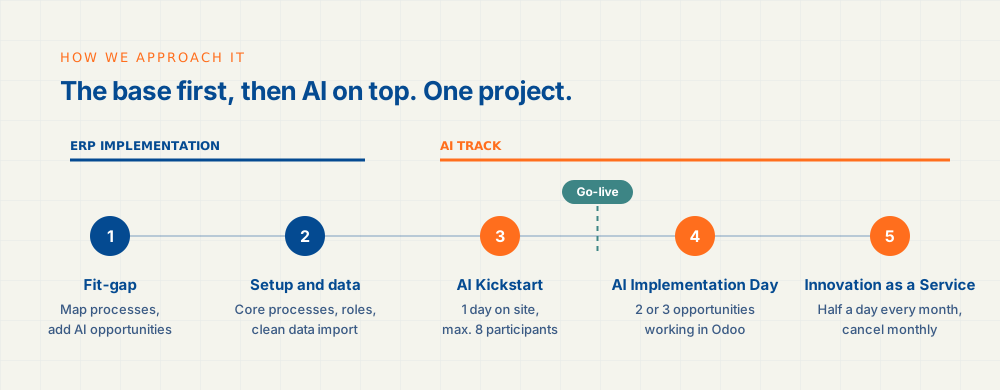
- Fit-gap. We map your processes and produce a project plan with hours per component. The AI opportunities go straight into it.
- Setup and data. Core processes, permissions and roles, key-user training and a clean data import. This is the foundation.
- AI Kickstart. A day on site, with up to eight participants. Beforehand everyone fills in a short baseline survey of about fifteen questions. Morning: what Claude can do, what it may do and how to use it safely. Afternoon: hands-on with your own work. You leave with working applications and a list of opportunities.
- AI Implementation Day. After go-live we pick the two or three opportunities that pay off most. We make them work, in Odoo and/or via MCP.
- Innovation as a Service. Half a day every month, at your office or ours. We show what is new and push through one improvement together. After three months we repeat the baseline survey. Cancel monthly.
That takes you from first meeting to working applications on your own data in two days.
Start with the foundation
Choosing Odoo? Ask about the AI opportunities in the very first conversation. We then set up your Odoo so AI can build on it from go-live. A solid base gets better with AI. A messy one just gets messy faster.
Book a conversation and bring a few processes where your team spends the most time today.
Further reading: